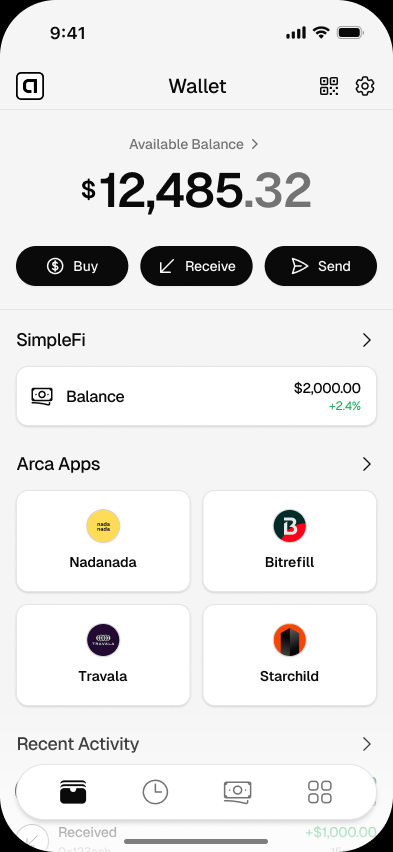
Why Arca on iPhone
- Email, Google, or Apple sign-in
- Create your wallet with Privy-powered sign-in using the login method that works for you.
- Smart wallet setup
- After sign-in, Arca links your embedded wallet to a ZeroDev smart account for app use.
- Embedded wallet signer
- Arca uses a Privy embedded signer with a ZeroDev smart account for non-custodial wallet control.
- WalletConnect deep links
- Open supported requests from the same phone with an Arca link, or scan a WalletConnect QR code in the app.
- USDC and USDT, ready
- Hold digital dollars on Base or Optimism. No conversion math.
- Review before you send
- Arca shows the token, network, amount, and destination before wallet actions you approve.
How it works
- 01
Download Arca from the App Store
Open the official listing and install Arca Wallet on your iPhone.
- 02
Sign in with email, Google, or Apple
Privy creates your embedded wallet and Arca links it to your smart account.
- 03
Receive, send, or connect
Receive supported digital dollars, send to a wallet, or review WalletConnect requests from supported apps.
iPhone specifics
- Platform
- iPhone app; App Store requirements apply
- Sign-in
- Email, Google, or Apple
- Tokens
- USDC, USDT
- Networks
- Base, Optimism
- Price
- Free
- Custody
- नॉन-कस्टोडियल स्मार्ट वॉलेट
Frequently asked questions
Is Arca Wallet on the App Store?
Arca Wallet is available on the App Store. Use the download button on this page to open the official listing.
Is Arca Wallet free on iOS?
Free to download. Network, provider, or app fees may apply when you add funds, send, sell, or use partner apps.
Does it work on iPad?
Arca is designed for iPhone first. iPad support is on the roadmap.
Do I need a bank account?
No bank account is required to create the wallet or receive supported digital dollars. Some add-funds or off-ramp partners may ask for a payment method, country, or identity info.
Looking for Android?
The Android version is available on Google Play. Download for Android →