Download Arca
Best App to Hold Digital Dollars: What to Look For
Compare the features that matter in an app for holding digital dollars, including control, clarity, supported tokens, and mobile usability.
- Free to download
- No bank account needed
- Your keys, your dollars
- Look for
- Clear controls
- Avoid
- Trading clutter
- Must support
- USDC and USDT
- Security
- Backup clarity
Get started
Set up your wallet in minutes
- 01
List your main need
Decide if you mainly want to save, receive, send, or use apps.
- 02
Check token support
Make sure the wallet supports the digital dollars you expect to use.
- 03
Review custody
Understand who controls the wallet keys and how recovery works.
- 04
Test with a small amount
Use a small transfer before holding a larger balance.
Good to know
There is no universal best app to hold digital dollars. There is a best app for the job you are trying to do.
If your job is trading, you may want a complex wallet with markets, advanced routes, and dozens of token tools. If your job is holding and sending dollars, that complexity can get in the way.
Arca is built for the second case.
The Four Things That Matter Most
When comparing digital dollar apps, ignore the noise first. Look for four practical things.
Clear dollar balances. You should understand what you hold without decoding a chart.
Support for USDC and USDT. These are the two major digital dollars most users encounter.
A security model you understand. If the wallet is non-custodial, you need to know how backup and recovery work.
Simple send and receive flows. The app should help you review the token, network, amount, and destination before money moves.
Everything else is secondary.
A Comparison Checklist
Use this checklist before choosing a wallet:
| Feature | Why it matters |
|---|---|
| Dollar-first interface | Reduces mistakes for everyday users. |
| USDC and USDT support | Covers the most common digital dollar flows. |
| Non-custodial control | Keeps wallet access in your hands. |
| Clear backup guidance | Helps prevent loss if your phone changes. |
| App compatibility | Lets you use digital dollars beyond wallet-to-wallet transfers. |
| Mobile performance | Matters on mid-range phones and slower connections. |
Arca was designed around that list, not around speculative trading.
Where Arca Fits Best
Arca is a strong fit if you want to:
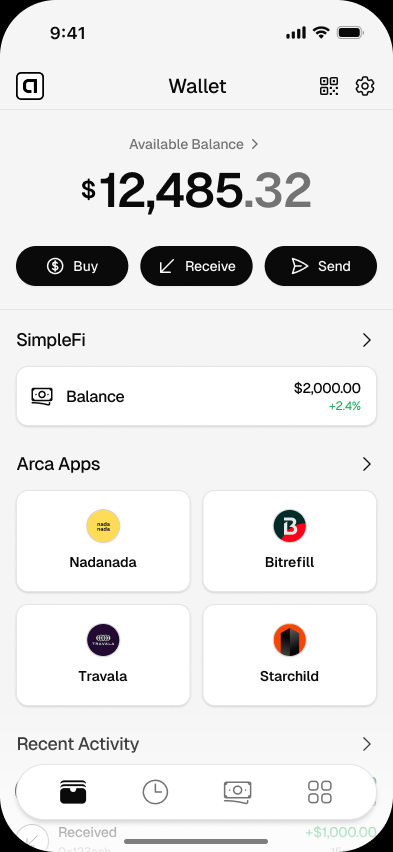
- Hold dollars on your phone.
- Receive digital dollars from someone else.
- Send digital dollars to another wallet.
- Use apps that work with Arca through the Arca Apps directory.
- Learn digital dollar basics without an overwhelming interface.
It may not be the right primary app if your main need is advanced trading, complex portfolio tracking, or managing dozens of assets.
That boundary is intentional. A focused wallet can be easier to trust because it does fewer things clearly.
What “Best” Should Not Mean
Best should not mean loudest. It should not mean the most token logos, most charts, or most hidden menus.
For most dollar users, best means:
- I can understand my balance.
- I can receive money without confusion.
- I can send money carefully.
- I can recover my wallet if I lose my phone.
- I know what risks I am taking.
That is the standard Arca is built around.
Start With the Route That Matches Your Phone
If you are ready to try Arca, open Arca for iPhone or Arca for Android.
If you want more background first, read what digital dollars are and are digital dollars safe?.
Questions
Answers before you download
What is the best app to hold digital dollars?
The best app depends on your needs. For everyday holding and sending, look for clear dollar balances, USDC and USDT support, strong wallet security, and simple receive and send flows.
Why choose Arca over a trading wallet?
Arca is designed for people who want a dollar wallet, not a trading dashboard. It focuses on holding, receiving, sending, and using digital dollars.
Should the wallet be custodial or non-custodial?
A non-custodial wallet gives you control of your keys, but it also makes you responsible for backup and security. Choose the model you understand and can manage.
Do I need both USDC and USDT support?
It is useful. Different senders, apps, and regions may prefer one digital dollar over the other.
Try a dollar-first wallet
Arca is built for holding, sending, and using digital dollars without the trading clutter.
Related pages
Arca Wallet for Android: Dollar Wallet for Android Phones
Download Arca Wallet for Android and use a mobile dollar wallet for USDC, USDT, sending money, and compatible apps.
Arca Wallet for iPhone: Dollar Wallet for iOS
Download Arca Wallet for iPhone and use a simple iOS dollar wallet for USDC, USDT, sending money, and using compatible apps.
Dollar Wallet App for Holding and Sending Dollars
Download Arca, a simple dollar wallet app for holding USDC and USDT, sending dollars, and using digital dollars from your phone.