Download Arca
Arca Wallet for Android: Dollar Wallet for Android Phones
Download Arca Wallet for Android and use a mobile dollar wallet for USDC, USDT, sending money, and compatible apps.
- Free to download
- No bank account needed
- Your keys, your dollars
- Platform
- Android
- Sign in
- Google or email
- Use case
- Dollar wallet
- Designed for
- Mobile access
Get started
Set up your wallet in minutes
- 01
Open the Android download page
Use the Arca Android download route from your phone.
- 02
Install and create your wallet
Follow the setup flow and secure your wallet.
- 03
Add or receive digital dollars
Use USDC or USDT once your wallet is ready.
- 04
Use apps from your phone
Browse compatible apps when you want to pay or connect with Arca.
Good to know
Arca Wallet for Android is built for people who need dollar access on the phone they already use every day.
That matters because Android is the primary phone platform for many users in emerging markets, migrant communities, and cross-border households. A dollar wallet has to work where people are, not only on expensive devices.
For the current installation flow, go to download Arca for Android.
What Arca Gives Android Users
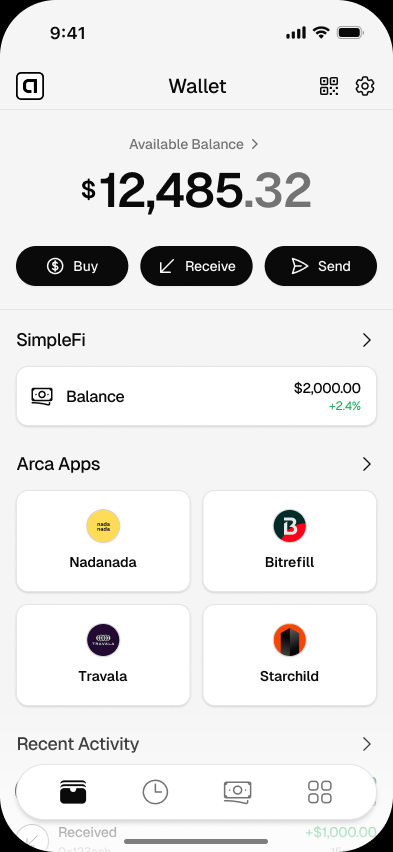
Arca gives Android users a mobile wallet for digital dollars. You can hold USDC and USDT, receive dollars from another wallet, send dollars, and use compatible apps.
The product is designed to stay readable and calm on mobile screens. No dense trading dashboard. No token noise on the first screen. The main job is clear dollar access.
Why Android Matters for Dollar Access
Many people who need dollar tools most are mobile-first. They may not have a laptop, a branch nearby, or easy access to a traditional dollar account.
An Android dollar wallet can help when someone needs to:
- Receive support from abroad.
- Keep part of their money in dollars.
- Send money to family.
- Use apps that accept digital dollars.
- Hold USDC or USDT without opening a traditional bank account.
If no-bank access is your main need, read no-bank dollar wallet.
What to Check Before Using Any Android Wallet
Before you rely on a wallet, check the basics:
| Question | Why it matters |
|---|---|
| Does it support your phone? | Older devices may have limits. |
| Does it explain backup clearly? | Backup protects access if your phone changes. |
| Does it support USDC and USDT? | These are the major digital dollars people send. |
| Does it show send details clearly? | Mistakes are easier to avoid when approvals are readable. |
Arca is designed with those checks in mind.
Start Small, Then Build Confidence
After installing, create your wallet and learn the backup flow before holding more than you can afford to lose. Then test receive and send with a small amount.
That first test makes the wallet feel practical. You see how money arrives, how it appears, and how approvals work.
When you are ready, browse Arca Apps to see where your wallet can be used beyond simple transfers.
Questions
Answers before you download
Is Arca available for Android?
Use the Arca Android download page for the current Google Play availability and setup instructions.
What Android version do I need?
Check the Android download page for current platform requirements.
Can I hold USDC and USDT on Android?
Yes. Arca supports USDC and USDT as digital dollars.
Is Arca hard to use on Android?
No. Arca is designed for clear mobile actions: receive, hold, send, and use apps.
Get Arca for Android
Turn your Android phone into a dollar wallet for USDC, USDT, and compatible apps.
Related pages
Arca Wallet for iPhone: Dollar Wallet for iOS
Download Arca Wallet for iPhone and use a simple iOS dollar wallet for USDC, USDT, sending money, and using compatible apps.
Best App to Hold Digital Dollars: What to Look For
Compare the features that matter in an app for holding digital dollars, including control, clarity, supported tokens, and mobile usability.
Dollar Wallet App for Holding and Sending Dollars
Download Arca, a simple dollar wallet app for holding USDC and USDT, sending dollars, and using digital dollars from your phone.