Download Arca
Dollar Wallet App for Holding and Sending Dollars
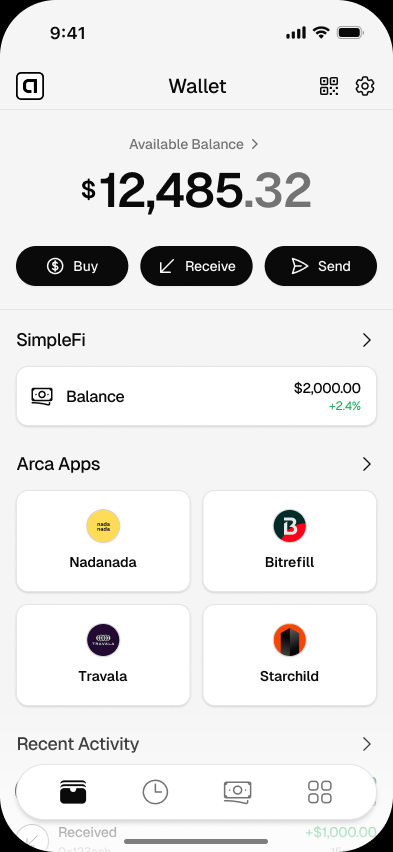
Download Arca, a simple dollar wallet app for holding USDC and USDT, sending dollars, and using digital dollars from your phone.
- Free to download
- No bank account needed
- Your keys, your dollars
- Setup
- Phone first
- Tokens
- USDC and USDT
- Custody
- You hold the keys
- Best for
- Everyday dollars
Get started
Set up your wallet in minutes
- 01
Choose your phone
Open the Arca iOS or Android download page from your mobile device.
- 02
Create your wallet
Sign in and create a wallet from your phone.
- 03
Add dollars
Add USDC or USDT when you are ready to hold or send dollars.
- 04
Use Arca for everyday dollar flows
Receive, send, hold, or pay compatible apps with digital dollars.
Good to know
A dollar wallet app should feel as familiar as checking your balance, not like learning a new financial language. Arca is built for that job: hold dollars on your phone, send them when you need to, and keep control of your wallet.
The point is simple. Your balance is in dollars. Your wallet is on your phone. You decide what happens next.
If you are comparing wallet apps, start with the basics: does it support the digital dollars you need, does it explain what you are approving, and does it make the everyday actions clear? Arca is designed around those three questions.
What Makes Arca Different From a Generic Wallet App?
Many wallet apps are built for traders. They lead with token lists, charts, swaps, and networks. That can be useful for advanced users, but it is not how most people think about money.
Arca starts with the jobs people already understand:
- Hold dollars for later.
- Receive dollars from someone else.
- Send dollars quickly.
- Use dollars in compatible apps and websites.
USDC and USDT sit underneath those actions, but the experience is organized around dollars. That matters for people who are using Arca to protect purchasing power, receive income, or send money to someone who just needs the money to arrive.
For a plain-language explanation of the concept, read what a dollar wallet is.
Who Is This Dollar Wallet App For?
Arca is most useful when your financial life crosses borders or currencies.
It fits people who earn in dollars, receive support from family abroad, save in dollars because their local currency is unstable, or want a wallet that works with apps accepting digital dollars.
It is not trying to be a trading terminal. It is a mobile dollar wallet. That narrower focus is the advantage.
What Can You Do With Arca?
You can use Arca for four core money flows:
| Need | How Arca helps |
|---|---|
| Hold dollars | Keep USDC or USDT in a wallet you control. |
| Receive dollars | Share your wallet details with someone sending funds. |
| Send dollars | Move dollars to another compatible wallet. |
| Use apps | Connect or pay with apps listed in the Arca Apps directory. |
If your main goal is saving, see the save in dollars app guide. If your main goal is sending money home, start with send money home with digital dollars.
How to Choose the Right Download
Use the page that matches your phone:
If you are still comparing options, use this page as your checklist. A good dollar wallet app should make setup clear, show your balance in dollars, explain important approvals, and avoid pushing you into features you did not ask for.
A Simple Way to Start
Start small. Download the app, create your wallet, and learn the basic receive and send screens before moving larger amounts. That gives you time to understand the flow and protect the login method tied to your wallet.
For security basics, see how Arca works as a non-custodial crypto wallet, then read custodial vs non-custodial wallets and what a recovery phrase is.
Arca is built to make that learning curve calm. You should feel like you are setting up a useful money app, not decoding a new system.
Questions
Answers before you download
What is a dollar wallet app?
A dollar wallet app lets you hold, send, and receive dollar-denominated digital money from your phone. Arca is built around USDC and USDT, with a simple mobile experience for people who want dollars without managing technical wallet details.
Is Arca a bank app?
No. Arca is a non-custodial wallet. That means you control your wallet keys and Arca does not hold your dollars on your behalf.
Can I use Arca if I am new to digital dollars?
Yes. Arca is designed for people who think in dollars. You do not need to understand trading, token charts, or technical crypto terms to start.
Which version should I download?
Use the iPhone download page if you are on iOS, or the Android download page if you are on an Android phone.
Download Arca on your phone
Start with a dollar wallet built for people who think in dollars, not crypto.
Related pages
Arca Wallet for Android: Dollar Wallet for Android Phones
Download Arca Wallet for Android and use a mobile dollar wallet for USDC, USDT, sending money, and compatible apps.
Arca Wallet for iPhone: Dollar Wallet for iOS
Download Arca Wallet for iPhone and use a simple iOS dollar wallet for USDC, USDT, sending money, and using compatible apps.
Best App to Hold Digital Dollars: What to Look For
Compare the features that matter in an app for holding digital dollars, including control, clarity, supported tokens, and mobile usability.