Download Arca
No-Bank Dollar Wallet: Hold Dollars Without a Bank Account
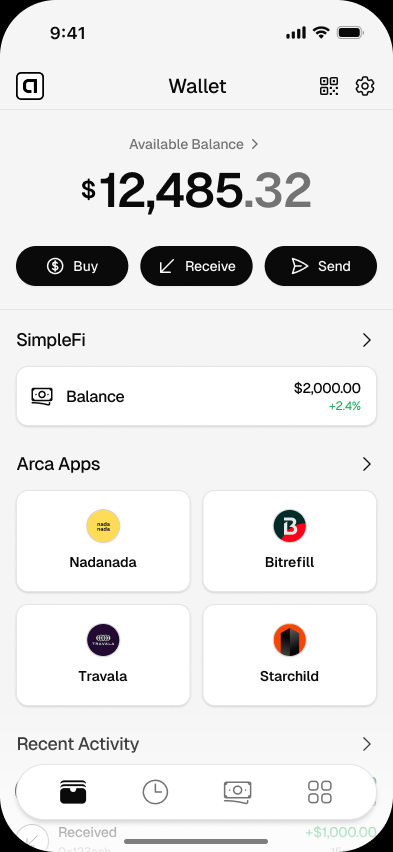
Use Arca as a no-bank dollar wallet to hold and send digital dollars from your phone without opening a traditional bank account.
- Free to download
- No bank account needed
- Your keys, your dollars
- Bank account
- Not required
- Use case
- Hold dollars
- Access
- Mobile
- Control
- Your keys
Get started
Set up your wallet in minutes
- 01
Download Arca
Choose the iOS or Android version for your phone.
- 02
Create your wallet
Set up your wallet without visiting a branch.
- 03
Review recovery access
Protect the sign-in tied to the wallet and review Keys & Recovery before holding meaningful funds.
- 04
Hold or send dollars
Use your wallet to receive, hold, or send digital dollars.
Good to know
Opening a dollar account has historically meant meeting someone else’s requirements. You may need a branch nearby, the right documents, a minimum balance, or a country where the provider operates.
A no-bank dollar wallet changes the starting point. Instead of asking a bank to open an account for you, you create a wallet on your phone and hold digital dollars directly.
Arca is built for that use case. It gives you a mobile wallet for USDC and USDT, without making the experience feel like a trading app.
When a No-Bank Dollar Wallet Helps
This page is for people who have a practical dollar need but no simple banking route.
You might be receiving help from family abroad. You might be paid in dollars for remote work. You might live in a place where local currency loses value quickly. Or you might simply want a way to hold dollars that does not depend on one local provider.
Those are different stories, but they share one need: a simple place to keep dollar value.
For the broader financial-access context, read how to hold dollars without a US bank account.
What Arca Does and Does Not Do
Arca gives you a wallet. It does not turn your phone into a traditional bank account.
That distinction matters.
With a traditional bank, the institution holds funds for you. With a non-custodial wallet like Arca, you control wallet actions through an embedded signer tied to your sign-in. That gives you more direct control, but it also means wallet security matters. You should understand recovery and protect that sign-in.
Here is the practical comparison:
| Question | Traditional bank account | Arca dollar wallet |
|---|---|---|
| Requires a branch | Sometimes | No |
| Holds dollars for you | The institution | You control the wallet |
| Can restrict access | Provider rules apply | Wallet access depends on your recovery access |
| Works from a phone | Usually | Yes |
| Recovery method | Provider account process | Same Arca sign-in; optional key export |
To understand that tradeoff, read custodial vs non-custodial wallets.
The First Thing to Learn: Control
Control is the reason people choose a no-bank wallet. It is also the responsibility.
When you create an Arca wallet, the embedded signer is tied to the email, Google, or Apple sign-in you selected. If your phone is lost or replaced, install Arca again and use that same method. Advanced users can optionally export the signer key, but that secret must never be shared.
This is different from provider-custodied access: Arca support cannot approve a wallet action or reveal a private key for you. Read the full non-custodial wallet and recovery overview before relying on the wallet for a larger balance.
Use Cases That Fit This Page
A no-bank dollar wallet is most useful for:
- Keeping a small dollar balance for emergencies.
- Receiving dollars from family or clients.
- Holding dollars before deciding when to convert locally.
- Paying compatible apps and services with digital dollars.
- Sending dollars to another compatible wallet.
If you are sending to family, read send money to someone without a bank. If you receive dollars from abroad, see receive dollars from abroad.
How to Start Safely
Start with a small amount. Learn how receiving works, how sending works, and how to restore your wallet before you rely on it for larger balances.
That slower first step is not friction. It is confidence. A wallet should be simple, but money still deserves care.
Arca keeps the interface calm so the important choices are visible. No token clutter. No noisy charts. Just the wallet actions you came for.
Questions
Answers before you download
Can I hold dollars without a bank account?
Yes. A digital dollar wallet like Arca lets you hold dollar-denominated value on your phone without opening a traditional bank account.
Do I need a US bank account to use Arca?
No. Arca is designed for mobile dollar access without a US bank account.
Is a no-bank wallet the same as cash?
No. Cash is physical money. Arca holds digital dollars such as USDC and USDT in a wallet you control from your phone.
What should I learn before using a no-bank wallet?
Learn how non-custodial wallets work, how Arca sign-in recovery works, and what risks digital dollars carry.
Open a dollar wallet from your phone
No branch visit. No traditional bank account. Just a phone and a wallet you control.
Related pages
Arca Wallet for Android: Dollar Wallet for Android Phones
Download Arca Wallet for Android and use a mobile dollar wallet for USDC, USDT, sending money, and compatible apps.
Arca Wallet for iPhone: Dollar Wallet for iOS
Download Arca Wallet for iPhone and use a simple iOS dollar wallet for USDC, USDT, sending money, and using compatible apps.
Best App to Hold Digital Dollars: What to Look For
Compare the features that matter in an app for holding digital dollars, including control, clarity, supported tokens, and mobile usability.