Control your wallet
Non-Custodial Crypto Wallet for Digital Dollars
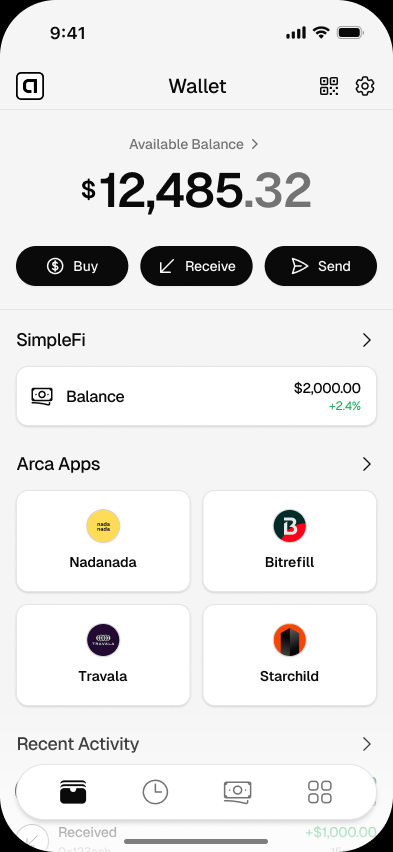
Arca is a non-custodial crypto wallet for USDC and USDT. Learn how wallet control, sign-in recovery, key export, security, and downloads work.
- You approve every send
- Focused on digital dollars
- Available on iOS and Android
- Custody
- Non-custodial
- Primary assets
- USDC and USDT
- Recovery
- Through your sign-in
- Advanced backup
- Optional key export
Get started
Set up your wallet in minutes
- 01
Download Arca
Choose the official iOS or Android version for your phone.
- 02
Use a sign-in you can protect
Create the wallet with email, Google, or Apple and secure that account with its available two-factor protections.
- 03
Review Keys & Recovery
Learn how sign-in recovery works and decide whether optional signer-key export is appropriate for you.
- 04
Test with a small amount
Receive and send a small amount before relying on the wallet for a larger balance.
Good to know
A non-custodial crypto wallet lets you approve transactions without handing control of the wallet to a bank, exchange, or app company. Arca uses that model for a narrower purpose: holding, receiving, sending, and using digital dollars such as USDC and USDT.
Arca is not designed as a trading dashboard for hundreds of tokens. It is a dollar-focused wallet for people who want a familiar balance, clear transaction review, and direct control from a phone.
Reviewed by the Arca Security Team on August 1, 2026. This page describes the current Arca mobile experience. Account access depends on the sign-in method and wallet setup you choose. Review how Arca keeps your wallet safe and the current Terms of Service before moving a larger balance.
What Non-Custodial Means
Custody answers one question: who can authorize movement from the wallet?
With a custodial account, a company holds or controls the credentials used to move the balance. You ask that provider to process a withdrawal, and its policies, security systems, and availability affect whether the request proceeds.
With a non-custodial wallet, the user controls the wallet credentials and approves wallet actions. The provider supplies software, but it does not hold the balance on the user’s behalf. This gives the user more direct control and more responsibility for sign-in security, recovery, and transaction review.
That distinction does not make every non-custodial wallet identical. Some wallets use a 12- or 24-word recovery phrase. Some use hardware devices. Arca uses an embedded signer connected to the user’s chosen sign-in method and a Smart Account for the wallet experience.
For a neutral comparison of both models, read custodial vs non-custodial wallets.
What Arca Is Built For
Arca is a non-custodial stablecoin wallet focused on everyday dollar actions:
- Hold digital dollars. Keep supported USDC or USDT in a wallet controlled through your account.
- Receive money. Share the exact wallet details shown in Arca and confirm the sender uses a supported token and network.
- Send money. Enter the destination, review the amount and network, and approve the transaction yourself.
- Use compatible apps. Connect Arca to supported websites and apps, then review each wallet request before approving it.
The wallet is deliberately narrower than a general-purpose crypto wallet. You will not find a trading-first homepage filled with price charts and speculative token lists. If you are new to digital dollars, start with the beginner stablecoin wallet guide. If you want the broader category explained first, read what a digital wallet is.
Arca Compared With a Custodial Account
The practical differences are easier to see side by side.
| Question | Custodial account or exchange | Arca non-custodial wallet |
|---|---|---|
| Who holds the balance? | The provider holds assets or account claims for the customer | The assets remain in the user’s wallet |
| Who approves a transfer? | The provider processes the withdrawal request | The user approves the wallet action |
| Can support reset wallet credentials? | Often, subject to the provider’s process | Arca support cannot reveal or reset a private key |
| How does normal recovery work? | Provider password or account recovery | Sign in again with the same email, Google, or Apple account |
| Is a seed phrase shown? | Usually no | Arca does not show a 12-word phrase during normal setup |
| Can the signer key be exported? | Usually no | Yes, as an optional advanced backup |
Direct control does not remove every dependency. The mobile app, its embedded wallet infrastructure, supported networks, token issuers, and any buy or withdrawal partner each have their own roles and risks. Non-custodial describes wallet control. It does not mean risk-free, anonymous, insured, or available through every provider in every country.
How Sign-In and Recovery Work
Arca’s normal setup does not ask you to copy 12 words. When you create the wallet, an embedded signer is connected to the email, Google, or Apple sign-in method you selected. That signer is used when you approve a wallet action, while the Smart Account is the address that holds the Arca balance.
If you replace or lose your phone, install Arca again and use the same sign-in method. If you have lost access to the underlying email, Google, or Apple account, use that provider’s account-recovery process first. Choosing a sign-in you expect to keep and enabling its available security protections are therefore part of protecting the wallet.
Arca support cannot manually sign a transaction for you. It also cannot display your private key from a support console. The recovery path depends on proving access through the sign-in and wallet recovery system.
Advanced users can choose to export the signer private key. Exporting creates a powerful backup, but it also creates a secret that anyone could use if it is exposed. The exported signer key may not look like the Smart Account address that holds the balance in a basic wallet app, so test any external recovery setup before deleting the Arca account.
A Seed Phrase Is Not the Definition of Self-Custody
A recovery phrase is one way to back up a wallet. It is not the definition of non-custodial control.
Traditional self-custody wallets often derive private keys from a sequence of 12 or 24 words. The user must protect those words because anyone who obtains them may be able to restore the wallet. Arca uses a different embedded-wallet recovery design and does not display a recovery phrase in normal setup.
If you use other wallets, you should still understand what a seed phrase is and how to protect it. Never enter recovery words into Arca, a support form, a message, or a website reached through an unsolicited link.
What Arca Supports
Arca’s main wallet experience focuses on USDC and USDT. These are digital assets designed to track the value of the US dollar, but they are not cash and they are not insured bank deposits. They carry issuer, reserve, technical, network, and market risks.
Support can vary by network and by the action you are taking. Always use the token and network shown in the current Arca screen. A valid address on one network does not prove that a token sent on another network will be recoverable.
Before choosing which digital dollar to hold, compare USDC and USDT safety tradeoffs. For the broader risk picture, read whether digital dollars are safe.
Who This Wallet Fits
Arca may fit if you want to:
- Hold dollar-denominated digital assets without keeping them in an exchange account.
- Receive USDC or USDT from a client, friend, or family member.
- Send digital dollars to another compatible wallet.
- Use a wallet that keeps trading features out of the main experience.
- Connect to compatible apps while reviewing requests before approval.
- Keep an optional signer-key export as an advanced exit path.
Arca may not fit if you need deposit insurance, branch support, chargebacks, guaranteed cash pickup, broad token trading, or a provider that can reverse a confirmed wallet transfer. A bank, regulated money-transfer provider, or custodial platform may be a better match for those needs.
How to Start Safely
Start with a small amount and treat the first transaction as a test.
- Download Arca from the official iPhone or Android page.
- Use an email, Google, or Apple account you control and protect it with the security options that provider offers.
- Open Settings > Security > Keys & Recovery and read how access and optional key export work.
- Receive a small amount of a supported digital dollar.
- Confirm the token, network, destination, and amount before sending it back out.
- Increase the balance only after you understand recovery and transaction review.
This short test will teach you more than a long list of wallet features. You will see what information Arca displays, how approvals work, and what you need to protect.
Control With Clear Boundaries
The useful promise of a self-custody wallet is direct authorization: the app company does not hold the balance and decide when you may withdraw it. The corresponding responsibility is that a confirmed blockchain transaction is normally final, and wallet access depends on the recovery method you chose.
Arca keeps that model focused on digital dollars. You get a wallet for USDC and USDT, a sign-in-based recovery path, an optional signer-key export, and clear transaction review from a phone. You also get honest boundaries: this is not a bank account, not deposit insurance, and not a guarantee that every provider or network will be available in every country.
If that tradeoff matches what you need, download Arca and begin with a small test balance.
Questions
Answers before you download
Is Arca a non-custodial crypto wallet?
Yes. Arca is a non-custodial wallet focused on digital dollars. Arca does not hold your balance or approve transfers for you. You authorize wallet actions from your device.
Does Arca give me a 12-word seed phrase?
No. Normal Arca setup does not give you a 12-word recovery phrase. Your embedded signer is tied to the email, Google, or Apple sign-in method you choose. Advanced users can optionally export the signer private key from Keys & Recovery.
What happens if I lose my phone?
Install Arca on another supported device and sign in with the same email, Google, or Apple account. Recovery depends on retaining or recovering access to that sign-in account. Arca support cannot manually approve a transfer or reveal a private key for you.
Can I use Arca for every cryptocurrency?
Arca is designed around digital dollars rather than broad token trading. Its primary wallet experience supports USDC and USDT on supported networks. Always check the token and network shown in the app before receiving or sending.
Do I need a bank account to use Arca?
You do not need a traditional bank account to create the wallet or receive supported digital dollars. Buy, withdrawal, and conversion options depend on the providers and countries available in the app.
Download a dollar wallet you control
Start small, review the security model, and use Arca for USDC and USDT from your phone.
Related pages
Arca Wallet for Android: Dollar Wallet for Android Phones
Download Arca Wallet for Android and use a mobile dollar wallet for USDC, USDT, sending money, and compatible apps.
Arca Wallet for iPhone: Dollar Wallet for iOS
Download Arca Wallet for iPhone and use a simple iOS dollar wallet for USDC, USDT, sending money, and using compatible apps.
Best App to Hold Digital Dollars: What to Look For
Compare the features that matter in an app for holding digital dollars, including control, clarity, supported tokens, and mobile usability.